
Cloud vs Colocation: What They Are, How They Differ, and When Colo Wins
Public cloud vs UK colocation explained — definitions, cost and control differences, colo benefits with illustrative graphs, and when a Cambridge hybrid beats all-in cloud.
“Move everything to the cloud” was the default pitch for a decade. For many UK workloads it still is the right answer. For others — steady databases, specialised hardware, predictable traffic, compliance that wants your kit in your cage — colocation is cheaper, faster and clearer once you stop comparing marketing slides.
This guide defines both models, shows the real differences, and focuses on why colo wins when the maths and control requirements line up. Related reading: What is colocation?, colo buyers guide, Cloud VPS (our own cloud-style footprint), and dedicated servers.
What is public cloud?
Public cloud means you rent compute, storage and network from a hyperscaler (AWS, Azure, GCP and similar) as metered services. You do not own the servers. You pay for:
- Virtual machines, containers or serverless runtimes
- Block / object storage and snapshots
- Egress bandwidth (often the silent budget killer)
- Managed databases, load balancers, licences and support tiers
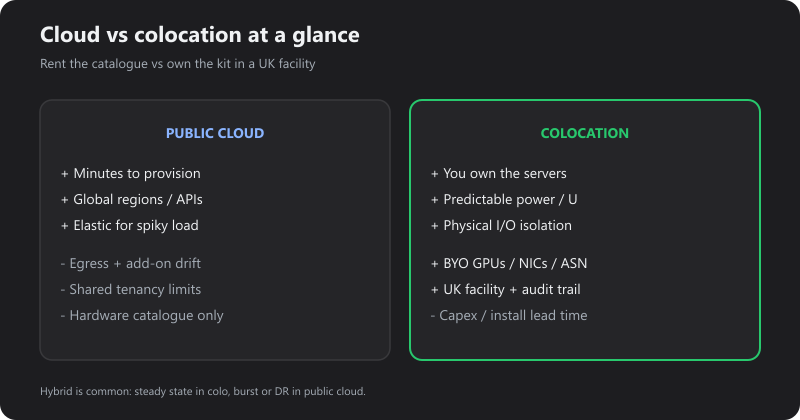
Strengths: near-instant provisioning, global regions, rich managed APIs, elasticity for spiky demand.
Weaknesses for steady UK production: egress and I/O pricing, noisy-neighbour risk on shared tenancy, less control over firmware / NICs / GPUs, and bills that drift as usage and “managed extras” accumulate.
What is colocation?
Colocation (colo) means you own or lease the hardware; the provider supplies the professional facility — space, power, cooling, physical security and network. At Fast2Host that is our privately owned Cambridge Tier III data centre on AS48825.
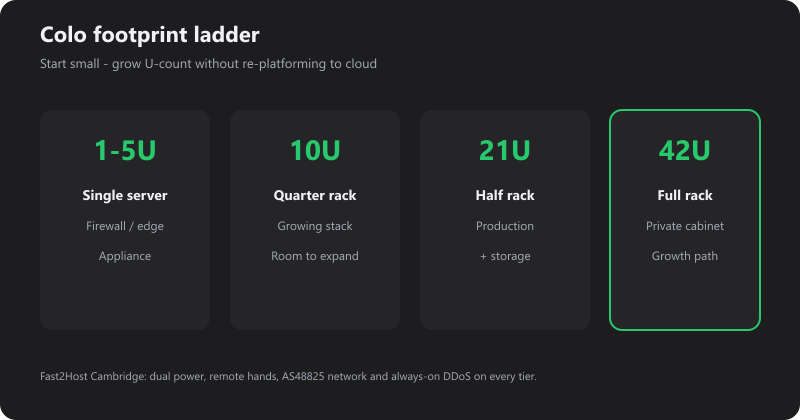
Typical footprints:
| Size | Typical use | Product |
|---|---|---|
| 1U–5U | Single servers, firewalls, edge | Rack units |
| 10U | Growing stacks | Quarter rack |
| 21U | Production + storage | Half rack |
| 42U | Private cabinet / growth path | Full rack |
You (or we) rack the kit; remote hands cover break/fix; DDoS on the edge is always-on Corero. Power is billed transparently in amps — see why we charge in amps.
Cloud vs colocation: the differences that matter
| Dimension | Public cloud | Colocation |
|---|---|---|
| Who owns the servers | Provider | You (or leased bare metal you control) |
| Provisioning | Minutes via API | Days–weeks for install; then stable |
| Cost shape | Variable opex (compute + storage + egress) | Capex (or lease) + predictable power / U / bandwidth |
| Performance | Shared pools; “burstable” SKUs vary | Dedicated physical I/O, NICs, GPUs as you specify |
| Hardware choice | Provider catalogue | BYO HPE, whitebox, appliances, GPUs |
| Network | Provider backbone + egress fees | Your ASN/IPs optional; carrier-neutral colo; peering |
| Compliance narrative | Shared responsibility + region choice | Physical access logs, locked cabinet, UK facility |
| Exit | Export data; rebuild elsewhere | Roll the rack out or redeploy |
Cloud is a service catalogue. Colo is a facility + network under your architecture.
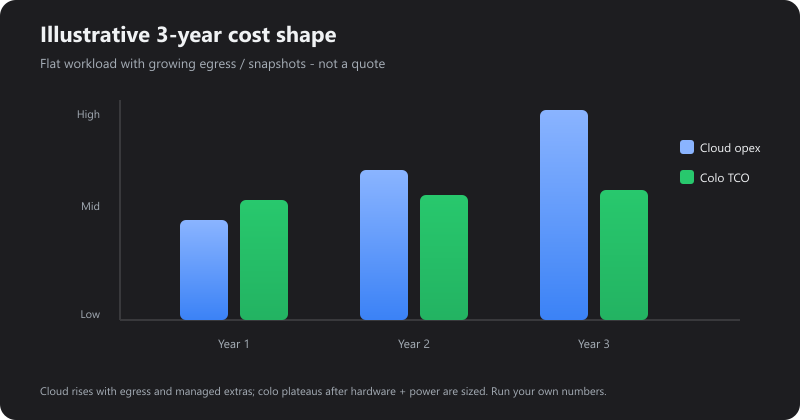
Illustrative only — your cloud bill and colo quote will differ. The shape is the point: cloud often keeps rising with egress, snapshots and managed add-ons; colo tends to plateau once hardware and power are sized.
Benefits of colocation (when it fits)
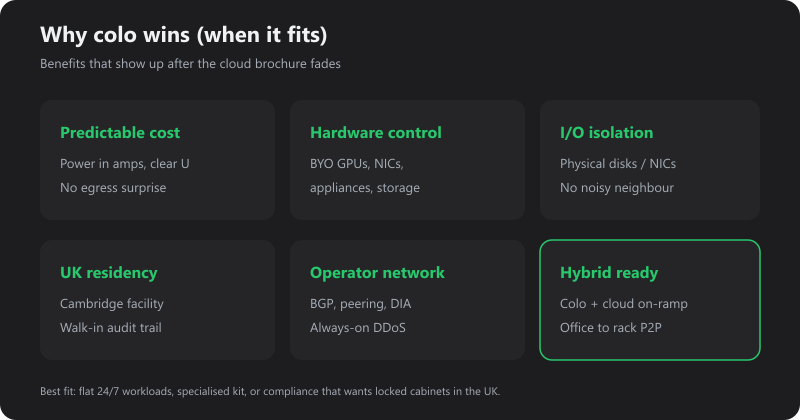
1. Predictable monthly cost
Once power draw and commit bandwidth are known, colo invoices are boring — in a good way. No surprise egress spike after a campaign or backup window. Amp-based power is explicit (pricing explained).
2. Full hardware control
Choose CPUs, NVMe layout, SmartNICs, GPUs, firewalls and tape/VTL appliances the cloud SKU list will not sell you — or will sell at a premium. Ideal for bare metal, Proxmox clusters and specialised media / AI boxes.
3. Performance isolation
Physical disks and NICs are yours. Databases and storage clusters stop fighting a noisy neighbour’s “credit” model.
4. UK data residency you can walk into
Cambridge facility, UK engineers, visitor logs and CCTV for auditors — not only a region dropdown. Tour context: our data centre and why Cambridge matters.
5. Network designed for operators
Bring your own ASN and PI space, BGP, cross-connects, leased line or point-to-point from the office into the rack, public cloud connect when you still want a private on-ramp to AWS/Azure/GCP. Edge DDoS is included on AS48825.
6. Hybrid without dogma
Keep steady state in colo; burst or DR to public cloud; put brochure sites on Cloud VPS or WordPress hosting. Colo is not “anti-cloud” — it is the right place for the kit that should not be rented by the hour forever.
Rough data points (use as planning anchors)
These are planning heuristics, not quotes:
| Signal | Typical reading |
|---|---|
| Steady 24/7 VMs with heavy egress | Colo or dedicated often undercuts cloud within 12–24 months |
| Spiky / seasonal / unknown demand | Public cloud elasticity wins early |
| Specialised GPUs / NICs / appliances | Colo or dedicated — cloud mark-up or availability gaps |
| Audit needs locked cabinets + access logs | Colo narrative is simpler |
| Team has no hardware ops | Cloud or managed dedicated / VPS first |
Industry analyses regularly show egress and managed premiums as the main reason “lift and shift” cloud bills exceed on-prem/colo TCO for flat workloads. Run your traffic and storage numbers both ways before renewing a big cloud commit.
When cloud still wins
- You need regions worldwide tomorrow
- Demand is highly elastic or experimental
- You want managed PaaS (queues, serverless, global CDN APIs) more than boxes
- Capex and racking skills are not available yet — start on Cloud VPS or dedicated, revisit colo when density justifies it
A practical decision path
- List workloads that are flat and chatty (databases, storage, VoIP cores, game shards, internal APIs).
- Estimate monthly egress and snapshot growth on cloud today.
- Size colo U-count and amps (tiers) or compare dedicated.
- Decide hybrid links: DIA, P2P into rack, cloud connect.
- Read the buyers guide and contact for a same-workload quote both ways.
FAQ
Is Fast2Host Cloud VPS the same as AWS?
No — our Cloud VPS is KVM in Cambridge on our network. It is cloud-style hosting, not a hyperscaler. Colo is when you bring (or we supply) the physical servers into the facility.
Can I connect colo to AWS/Azure/GCP?
Yes — private on-ramps via Public cloud connect, often alongside office DIA.
Do I need a full rack?
No — start at 1U and grow. Many teams land on quarter or half rack before a private 42U.
What about hands-on support?
Remote hands and a UK NOC — not a ticket queue that waits until Monday.
Next step
If your cloud bill is growing faster than your traffic, or you need hardware the catalogue will not give you, talk through a colo or hybrid design with our Cambridge team.