
Shared Hosting vs VPS Hosting in 2026: 7 Signs Your Business Website Has Outgrown Shared Hosting
Shared hosting vs VPS hosting for UK businesses in 2026: seven signs you have outgrown shared, when to stay, managed vs unmanaged, and how to choose a Cloud VPS.
Shared hosting is still the right first home for most UK brochure sites, blogs and small WordPress shops. You get a control panel, email, SSL and a patched platform without learning Linux. Many businesses stay there for years.
A virtual private server (VPS) becomes interesting when you need reserved resources, isolation or configuration the shared stack cannot give you. It is not a trophy upgrade. Plenty of growing firms should stay on cPanel or WordPress hosting and fix caching, plugins and queries first.
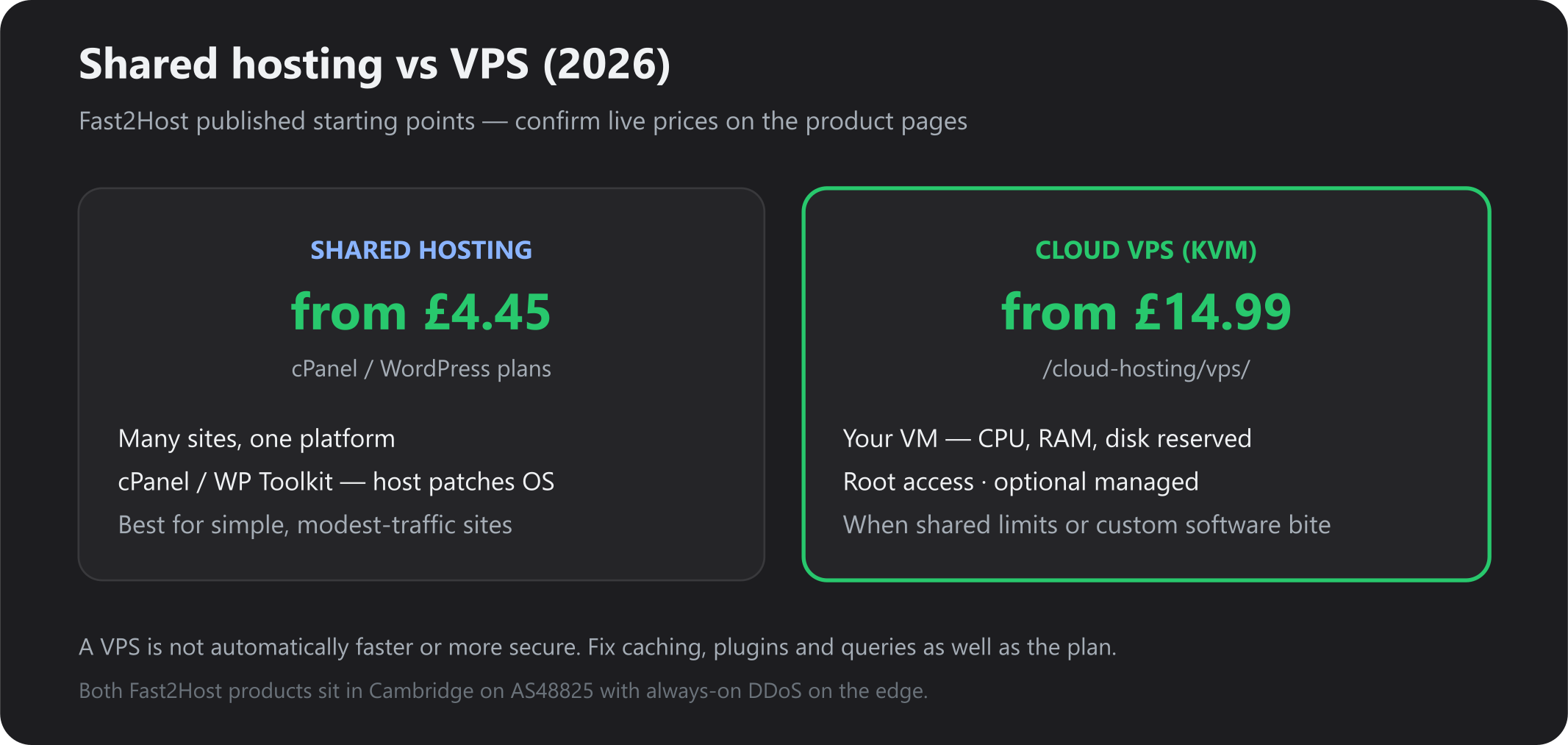
This guide is shared hosting vs VPS hosting in plain English: how they differ, seven signs you have outgrown shared, a balanced comparison, and how to decide — including managed vs unmanaged. Figures below are from our live product pages (cPanel from £4.45/mo, Cloud VPS from £14.99/mo). Confirm on Cloud VPS and web hosting before you order.
A companion piece covers migration mechanics and dedicated as the next step: When should you move from shared hosting to a Cloud VPS?.
Shared hosting vs VPS hosting: what’s the difference?
Shared hosting means many customer sites share one operating system and a curated stack (on Fast2Host: CloudLinux + LiteSpeed, cPanel or Plesk, WP Toolkit). The host patches the platform. You manage websites, not kernels. Resource limits (CPU, RAM, I/O) stop one account from flattening the server. That is efficient and cheap. It is also why a noisy neighbour — or your own runaway plugin — can make a quiet Tuesday feel like an attack.
VPS hosting (on Fast2Host, KVM Cloud VPS) carves out a virtual machine with CPU, RAM and disk reserved for you. You get root (or a managed arrangement), your own OS template, snapshots and the ability to install software the shared panel does not offer. Other customers still share the same physical host, but they do not share your guest OS. Isolation is stronger than CloudLinux LVE; it is not the same as a dedicated server. On Fast2Host shared starts from £4.45/mo and Cloud VPS from £14.99/mo — confirm live prices before you order.
Both Fast2Host products sit in our Cambridge data centre on AS48825, with always-on DDoS protection on the edge. Moving to a VPS does not automatically improve Google rankings. Search cares about what users feel (speed, uptime, security hygiene) — and a bloated theme on a large VPS is still slow.
Seven signs your business website has outgrown shared hosting
Look for a pattern over weeks, not one sale or one campaign. Rule out application issues first: uncached page builders, chatty plugins, missing object cache, huge autoloaded options, remote HTTP on every page load.
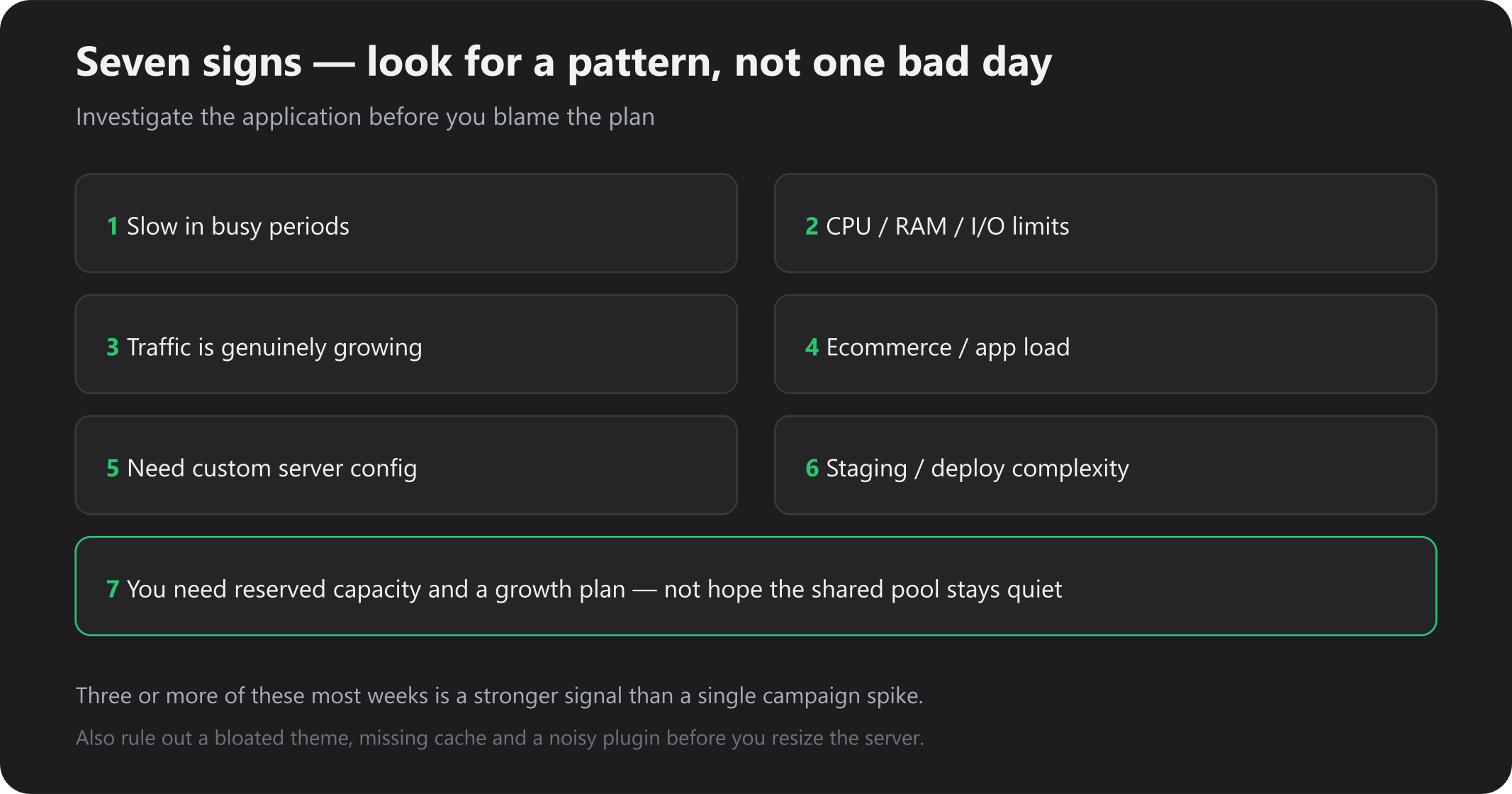
Sign 1: Your website becomes slow during busy periods
Lunchtime, a BBC mention, or a Google Ads burst should not turn checkout into a spinner — but shared limits and a heavy app look identical from the browser.
Check before you upgrade
- TTFB / server response in Search Console, CrUX or WebPageTest — if HTML is slow uncached, that is origin work, not “the CDN”.
- LiteSpeed Cache / page cache HIT on anonymous pages. If every hit is a PHP MISS, fix that first. See LiteSpeed WordPress hosting.
- Database: slow WooCommerce reports, unindexed queries,
wp_optionsautoload bloat. - Concurrent PHP workers dying while CPU on the account is pegged.
Anonymous pages should be cheap on shared once caching works. Checkout and WP-admin always hit PHP and MySQL. If those paths degrade only when several people overlap, you may be worker-bound — after removing the worst plugins. If the site is slow at 11pm with one visitor, buy a VPS last.
Sign 2: You regularly hit CPU, RAM or other resource limits
On Fast2Host shared, CloudLinux LVE throttles an account so it cannot take the whole server down. You may see “resource limit” notices, 503s, or WP-admin that crawls while the public cache still looks fine.
Read the graph, not the feeling. One backup or import spike is normal. Daily LVE hits during trading hours, PHP memory exhaustion, or MySQL using swap under modest traffic means the account envelope is too small — or the app is leaking. Tune first (object cache, fewer plugins, a current PHP version). If you still sit on the ceiling, a VPS lets you buy CPU/RAM instead of hoping the shared pool is quiet.
Reseller accounts with many client sites often hit this earlier than a single brochure — see cPanel reseller hosting versus a VPS when the pool is the problem.
Sign 3: Your website traffic is growing
Traffic is not a plan size. Ten thousand cached brochure hits can be cheaper than two hundred logged-in WooCommerce sessions.
Measure peak concurrent users and requests (not only monthly uniques), campaign and seasonal shape, and what extra visitors do (read a post versus search, cart, pay). A marketing spike on a well-cached WordPress blog is often still shared-hosting work. The same spike on an uncached membership site is not.
Size for the resource profile, then add headroom. Fast2Host Cloud VPS supports resource upgrades without rebuilding the OS. Treat repeatable peaks you can graph as the case for an upgrade, not a one-off ads burst.
Sign 4: Your ecommerce store or web application needs more resources
WooCommerce, large catalogues, logged-in pricing, search and reporting are database- and PHP-heavy. Checkout is where slow origin work loses money.
Shared hosting remains fine for a small catalogue with good caching and a modest order rate. Consider VPS (or dedicated) when admin reporting locks the storefront, you need Redis you cannot run on shared, background jobs queue too long, or you need a real staging copy of production.
A VPS does not fix a 40-plugin stack. Pair the move with WordPress Toolkit discipline on staging, or accept you will still be slow — just more expensively.
Sign 5: You need greater server configuration control
Stay on shared if cPanel, Plesk or WP Toolkit cover you. Move toward a VPS when you need root-level choices the platform will not make: Redis, OpenSearch, a queue worker, Docker, a specific Node or Python runtime, extra PHP modules, or SSH-first Git deploys.
That control is also responsibility. Unmanaged VPS means you patch the guest OS. Fast2Host offers managed Cloud VPS (OS updates, security patching, monitoring and hands-on administration) if you want the VM without becoming the sysadmin — details on the VPS page.
Sign 6: Your staging, development or deployment workflow has become more complex
A folder called /staging under public_html is not a production twin. Agencies and product teams eventually want a separate environment, SSH or CI that shared hosting fights, and matching PHP/extensions without waiting on the shared image.
What you get depends on how the VPS is set up and whether it is managed. A raw Ubuntu box does not magically give you WP Toolkit; you install (or we help install) the stack. Toolkit cloning on WordPress hosting is often enough until you outgrow the shared envelope.
Sign 7: You need a more suitable environment for the business’s growth
This is the unglamorous sign: you want predictable allocation, monitoring you can show a director, and a path to more CPU/RAM without a midnight migration.
A VPS does not guarantee better performance or security. It guarantees clearer tenancy and the option to configure. Security still needs updates, 2FA, backups you have restored, and a WAF/DDoS story — see the WordPress security checklist. Fast2Host Cloud VPS includes snapshots, optional scheduled VM backups, 600Gbps Corero DDoS on the network, and a 99.99% platform uptime SLA as published on the product page.
If you need the whole machine, skip VPS and read dedicated vs Cloud VPS.
Shared hosting vs VPS hosting: comparison table
| Shared hosting | VPS hosting (KVM) | |
|---|---|---|
| Cost | Lower (Fast2Host cPanel from £4.45/mo) | Higher (Cloud VPS from £14.99/mo) plus your time or a managed fee |
| Resource allocation | Limits in a shared pool (LVE on our Linux shared) | CPU, RAM and disk reserved to the VM |
| Configuration flexibility | Panel and approved stack | Root: packages, daemons, versions — if you (or managed) run them |
| Technical management | Host owns the platform | You own the guest OS unless managed |
| Scalability | Move up shared tiers; still a shared kernel | Resize the VM; dedicated if you outgrow that |
| Suitable workloads | Simple sites, modest traffic, standard WordPress | Busier shops, apps, custom software, real staging |
| Maintenance | Updates inside the panel; host patches OS | OS + app patching (split if managed) |
| Security considerations | Isolation via account limits; one kernel, many customers | Stronger OS isolation; you must still patch and harden the guest |
Network and facility quality can be identical (ours is). The difference is tenancy and control.
When should you stay on shared hosting?
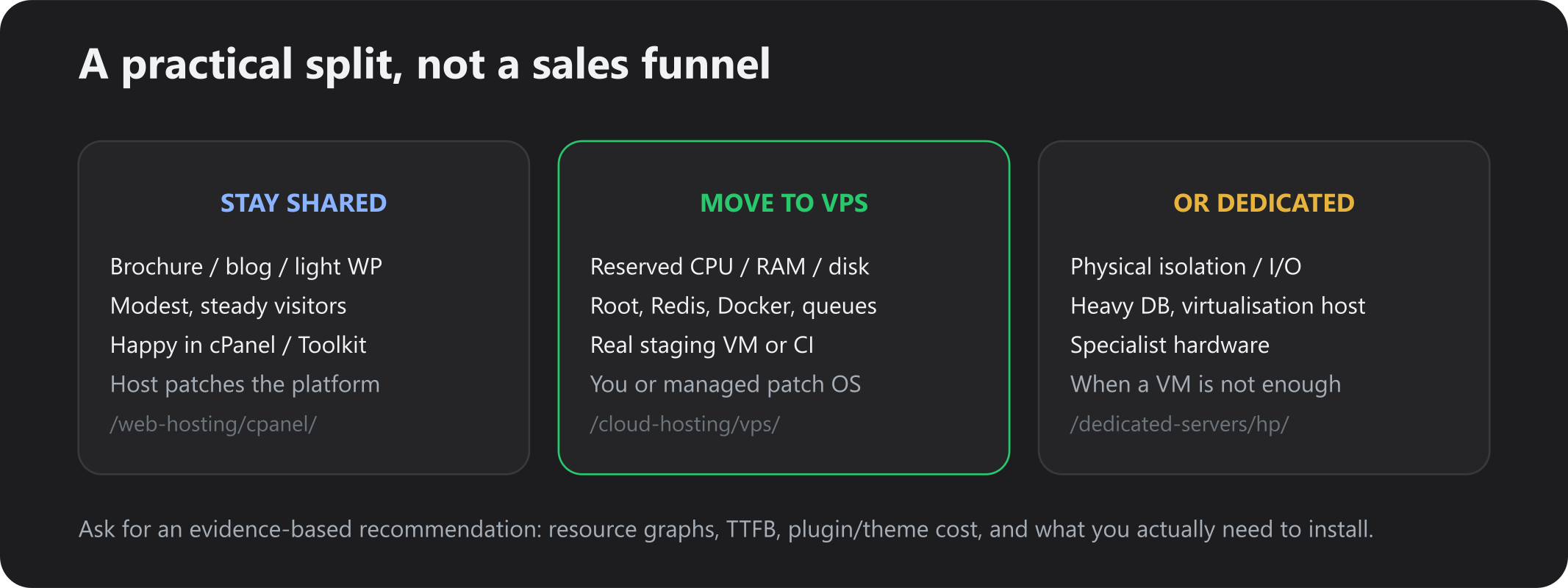
Stay if most of this is true: a brochure site, blog or small WordPress/WooCommerce catalogue; traffic is modest and cached pages stay fast in busy hours; you do not need Redis, Docker or a custom daemon; you prefer not to administer Linux; email plus a few sites is the whole IT estate.
That is not “failing to scale”. It is matching spend to risk. LiteSpeed and Toolkit on shared often outperform a neglected VPS.
When is VPS hosting worth the extra cost?
Worth it when the cost of slowness, refused architecture, or weekly LVE fights exceeds the extra monthly fee and the ops burden. That is a total-cost question, not a “VPS sounds faster” question.
Budget for the VM itself (from £14.99/mo on Fast2Host Cloud VPS — confirm live), time to patch, monitor and backup — or managed support — plus migration (we can move sites; open a ticket or see migration).
Benefits: reserved capacity, root, snapshots before risky changes, OS choice (Linux/Windows templates), upgrades without rebuilding the disk. None of that replaces application hygiene.
Managed VPS vs unmanaged VPS
Unmanaged (root): you install, patch, firewall, monitor and backup the guest. Fast2Host still runs the KVM platform, Virtualizor, facility and DDoS. You are the sysadmin of the VM. That suits developers and agencies who already live in SSH.
Managed (as published on our Cloud VPS FAQ): OS updates, security patching, monitoring and hands-on administration from the UK team, on top of the same KVM platform. Confirm the current managed scope on the Cloud VPS page before you assume application-level work (plugin updates, WooCommerce tuning) is included — those usually remain yours.
If you only wanted “someone else patches WordPress”, that is still shared or managed WordPress — not a VPS. Buying an unmanaged VPS to “make WordPress easier” is the common expensive mistake.
How to decide which hosting plan you need
Print this before you talk to sales:
- Resource usage — a week of CPU, RAM, I/O, LVE or equivalent graphs, not a hunch.
- Server response times — TTFB on cached versus uncached URLs.
- App and database — slow queries, plugin/theme cost, object cache present or not.
- Traffic pattern — peaks, campaigns, logged-in versus anonymous.
- Software requirements — list daemons and versions shared hosting cannot run.
- Cost of downtime / slow checkout — a back-of-envelope hour of lost orders.
- Total cost of ownership — plan fee plus your time or managed plus migration.
- Ask the host for an evidence-based recommendation — send the graphs. We would rather keep you on cPanel than sell a VPS you will hate to patch.
Frequently asked questions
Is VPS hosting faster than shared hosting?
Not automatically. A VPS is faster when you were CPU, RAM or I/O bound on shared, or you add software (for example Redis) you could not run before. It is not faster if the bottleneck is a plugin or an unindexed query.
When should I upgrade from shared hosting to VPS?
When several of the seven signs are true most weeks, you have already tuned the app, and you accept OS responsibility (or will pay for managed).
Is VPS hosting suitable for WordPress?
Yes. Busy WordPress and WooCommerce sites often run well on a sized KVM VPS. Simple blogs usually should not bother. Toolkit workflows are easier on WordPress hosting until you outgrow it.
Is VPS hosting worth it for a small business?
Only if the limits or software needs are real. A five-page brochure site is not a VPS problem. A shop that loses orders at lunchtime often is. Compare the extra monthly fee with an hour of lost checkout.
Do I need technical knowledge to use a VPS?
Unmanaged: yes — SSH, updates and firewalls. Managed: less so, but you still own the application. Shared remains the lowest-knowledge option.
Can I migrate from shared hosting to VPS without losing my website?
Yes, with DNS TTL, a staging copy, SSL and a cutover window. Fast2Host can migrate; see migrate WordPress and migration services. Keep the old account until checkout and email work on the new hostname.
Is VPS hosting more secure than shared hosting?
It is more isolated at the OS. It is not more secure if you skip patches, 2FA and backups. Shared puts platform patching on the host; unmanaged VPS puts guest patching on you.
Conclusion
Shared hosting vs VPS hosting is a tenancy and control decision, not a status one. Stay on shared while the app is simple, traffic is cache-friendly, and cPanel or WP Toolkit is enough. Move to a VPS when reserved resources, root, or a stack the panel cannot run is cheaper than fighting limits — and only after you have measured.
Explore Cloud VPS hosting (KVM, snapshots, optional managed, from £14.99/mo on the published page) or stay on cPanel / WordPress. For a plan that matches your graphs, open a ticket — ask for an evidence-based recommendation, not a bigger invoice.