
When the Cloud Goes Down: Why Businesses Should Rethink Their Dependence on Microsoft 365 and Cloud Services
The cloud promises convenience, flexibility and reliability. But what happens when the services your entire business depends on suddenly stop working?
On 12 November 2026, businesses around the world were reminded of an uncomfortable reality: even the largest technology companies are not immune to major infrastructure failures.
Microsoft experienced a widespread disruption affecting Outlook, Exchange Online and several other Microsoft 365 services. Businesses found themselves unable to access email, collaborate with colleagues or use services they had come to rely on every day.
What made the incident particularly concerning was its duration. The disruption continued into the following day. By the time meaningful recovery was visible in the UK, the outage had already lasted more than 21 hours.
For organisations that depend heavily on Microsoft 365, this was more than an inconvenience. It was a reminder of how much modern businesses depend on infrastructure they do not own, operate or directly control.
It also raises an important question: have businesses become too dependent on the cloud?
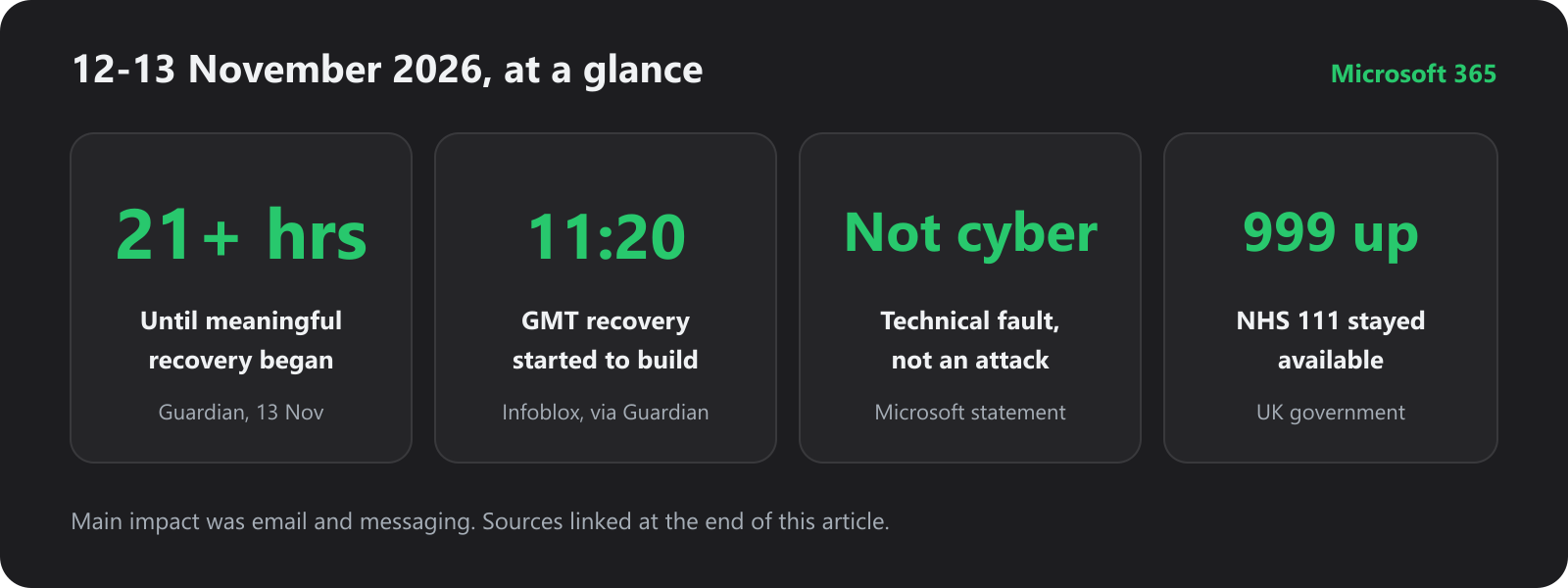
Sources: The Guardian, reporting Microsoft’s statement and UK government comments, and Infoblox data cited there. The 999 and NHS 111 lines were not the systems that failed. Email and messaging were.
1. The Microsoft 365 outage: a reminder that the cloud can fail
Microsoft 365 has become an essential part of everyday business operations.
From Outlook and Exchange Online to Teams, SharePoint, OneDrive and Microsoft 365 applications, millions of organisations depend on Microsoft’s cloud to keep work moving. The Guardian’s account of the incident described disruption affecting millions of people, including businesses, government agencies and Microsoft’s own staff.
Microsoft tracked the main incident as MO1550821. In its admin-centre advisory it said customers might be unable to connect to Exchange Online, Teams, SharePoint Online, Microsoft 365 Copilot and Microsoft Defender XDR. Later status updates also listed Outlook.com, OneDrive, OneNote, Microsoft To Do and Microsoft 365 for the web. Impact was patchy: some people kept partial access, and some regions recovered faster than others.
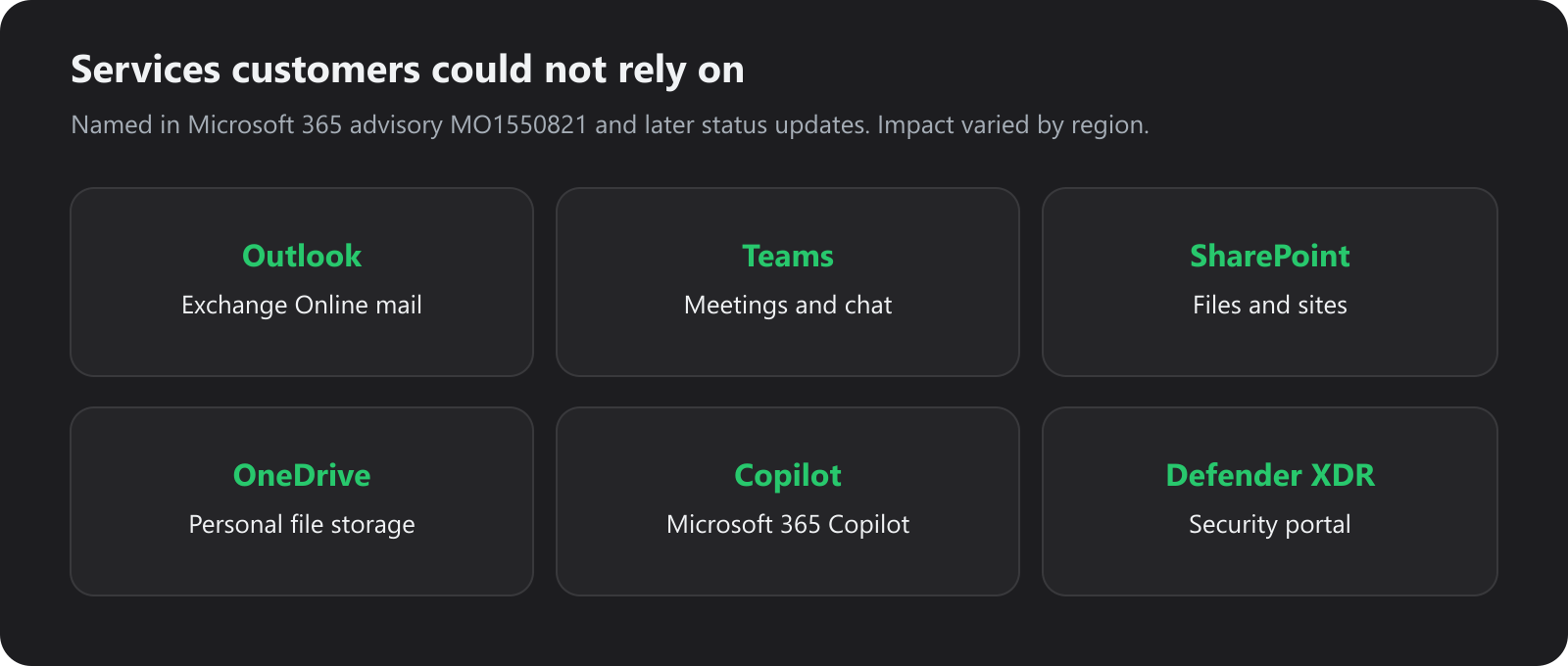
Named across Microsoft’s advisory and later status updates, as reported by BleepingComputer and The Guardian. Not every customer lost every service.
During the incident, Microsoft said the strain was not a surge in traffic. Servers had become unexpectedly unavailable, which left the remaining infrastructure carrying the load. It paused deployments, shifted traffic and restarted affected servers. A separate Teams messaging fault earlier the same day, tracked as TM1550488, had already been resolved before this wider outage.
Microsoft later said the problem was a technical issue, not a cyber attack and not related to AI. In a statement carried by the Guardian, it said the incident was introduced during an earlier network capacity upgrade and surfaced after a recent network change.
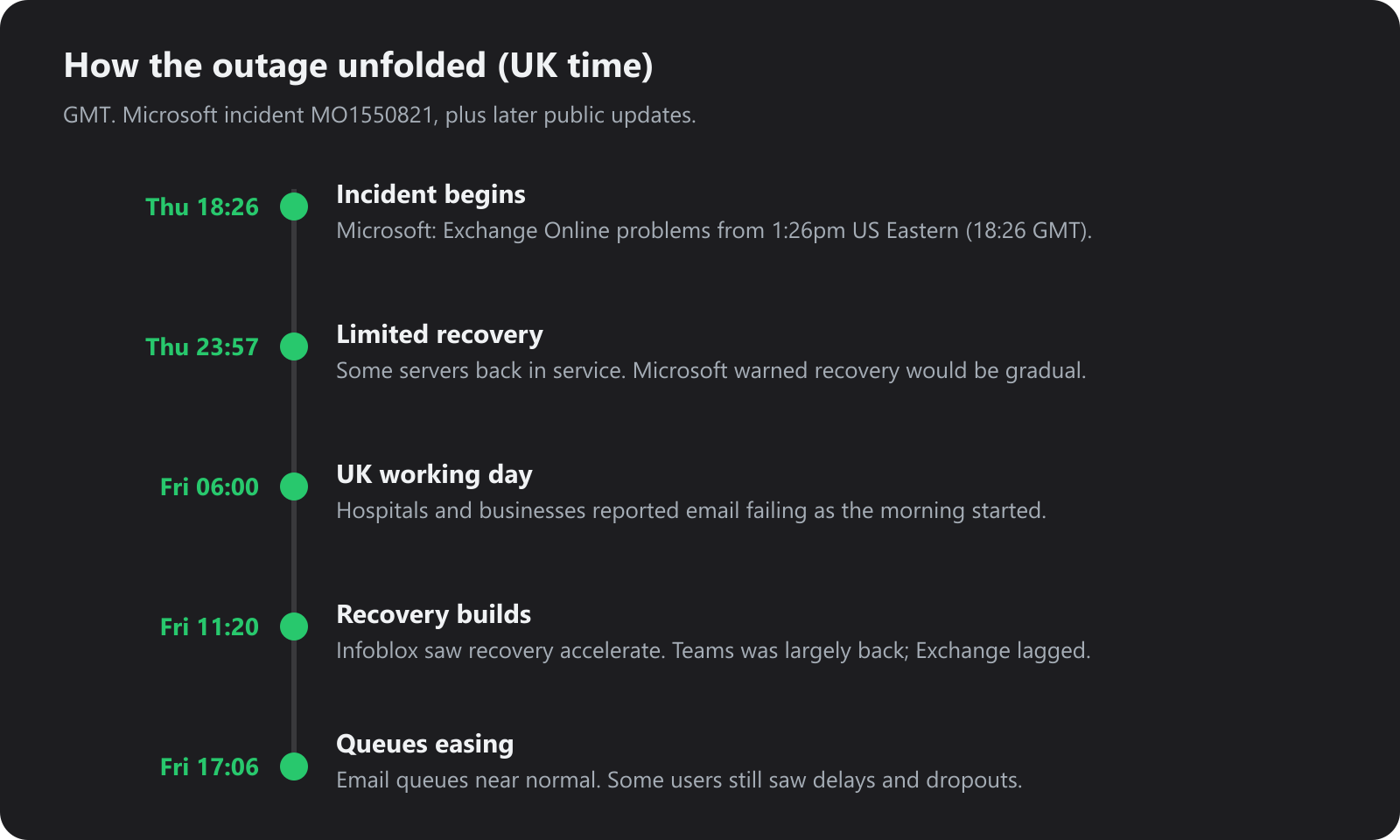
Times in GMT. The start time is Microsoft’s, converted from 1:26pm US Eastern. The 11:20 GMT mark is Infoblox data reported by the Guardian. The 17:06 GMT update is Microsoft’s note that email queues were approaching normal, with some users still intermittent.
By Friday morning the worst of the problem had narrowed to Exchange, while Teams meetings and chats were largely back. That did not make the morning usable for everyone. UK hospital staff told the Guardian the failure became obvious from about 6am. A West Yorkshire business owner said quotes and reports sat unfinished until mail started moving again in the afternoon. Another owner could not reach payroll data, so staff waited to be paid.
UK cyber minister Baroness Lloyd said the government had been working with Microsoft, and that the impact on public services was mainly back-office email and messaging. The 999 service and NHS 111 stayed up. That is an important distinction, and it is also the point: the systems that failed were the ones many organisations use to do ordinary work.
For a business that runs almost everything through Microsoft 365, there is very little to do while the provider restores its own platform. That is the risk of cloud dependency.
2. The cloud is not actually a cloud
The term cloud computing can make the technology sound almost magical.
People upload files, read email, run applications and store business information without thinking about what sits underneath. The cloud is not an abstract, indestructible place. It is physical infrastructure.
Behind every cloud service are:
- Physical servers.
- Storage systems.
- Network switches and routers.
- Data centres.
- Power distribution systems.
- Cooling infrastructure.
- Software platforms.
- Authentication and security systems.
All of these have to work together. A fault in one part can take services down that depend on it.
Large cloud providers spend heavily on redundancy, monitoring and disaster recovery. Redundancy still does not remove every failure. A network change, a capacity upgrade, an overloaded process or a set of servers dropping out of service can disrupt a huge number of customers at once. That is what Microsoft described here.
Cloud computing changes who manages the infrastructure. It does not remove the infrastructure.
3. The danger of putting all your eggs in one basket
Using cloud services is not the problem. Relying on one provider for too many critical functions is.
A typical Microsoft 365 estate concentrates a lot of daily work in one place:
| Business function | Often depends on |
|---|---|
| Exchange Online | |
| Meetings and chat | Microsoft Teams |
| File storage | OneDrive |
| Document collaboration | SharePoint |
| Sign-in | Microsoft Entra ID |
| Line-of-business apps | Microsoft 365 integrations |
| Automation | Power Automate |
That arrangement is attractive. Administration is centralised, and people can work from almost anywhere.
When the provider has a bad day, the same arrangement is the problem. Mail stops. Documents are hard to reach. Meetings fail. Anything that needs Microsoft sign-in can fail with them, including tools that were not themselves broken.
The November outage showed a milder version of the same pattern. Teams came back while Exchange was still the bottleneck. People could talk in one product and still not send the email the business was waiting on. Authentication and mail sit underneath so many other tasks that a single fault spreads.
This is not unique to Microsoft. The same concentration applies to Google Workspace, Amazon Web Services, Azure and any other platform that becomes the default for everything.
4. Cloud availability is not the same as business continuity
A major provider’s availability target is not a promise that your work will continue.
Microsoft can restore Exchange Online. It cannot invent a second way for your team to answer customers while that restore is still in progress. A storage platform can keep several copies of a file and still leave you unable to open the working copy your staff actually use.
Continuity is the plan for the gap. It should answer questions like these before anyone is staring at an error page:
- What happens if email stops for 24 hours?
- Can people open the documents they need without the cloud platform?
- How do we talk to customers during an outage?
- Can staff sign in to essential systems if the identity provider is down?
- Do we have backups that are not inside the same platform?
- How quickly can we restore a critical application somewhere else?
- Who coordinates that recovery?
Those answers are much harder to invent at 6am, when the inbox is already silent.
5. Why backups are not enough
Backups matter. They are not a complete recovery plan.
A backup can protect you against deletion, ransomware or corruption. It does not, by itself, give people their normal working environment when SharePoint and OneDrive are unreachable. Someone still has to know which documents matter, where the spare copy lives, and how to get at it without the service that just failed.
Microsoft does not keep that spare copy for you. Mailbox retention, file versions and the recycle bin all sit inside the same Microsoft 365 tenant. When Exchange and OneDrive are unreachable, those copies are unreachable too.
Microsoft says so in its own Services Agreement. It is not liable for disruption or loss, and in an outage you may not be able to retrieve the content you stored on the services. The agreement then tells customers to keep their own copy: “We recommend that you regularly backup Your Content and Data that you store on the Services or store using Third-Party Apps and Services.”
That third-party copy is what Acronis Cyber Protect is for. We take Microsoft 365 mail, files and collaboration data out of the tenant and store them on UK Acronis infrastructure in our Cambridge data centre. A mailbox or a file can be restored from that copy without waiting for Microsoft to finish recovering its own platform. How that works in practice is in Backups That Recover: Acronis Cyber Protect for UK Businesses.
Worth deciding in advance:
Independent backups. Keep critical information outside the primary platform, and protect those copies against being changed or deleted along with the original.
Offline access. Name the documents, contacts and operating notes that have to stay reachable during a long outage.
Another way to communicate. Agree how people will talk if mail and Teams are both unavailable. Write the phone numbers down somewhere that is not inside the broken mailbox.
A restore test. A backup that has never been restored is an assumption.
A short procedure. People should know the first three things to do when the usual tools disappear. They will not read a 40-page plan while customers are waiting.
6. Is keeping some infrastructure in-house or privately hosted a better option?
It depends on the organisation and the workload.
Public cloud is good at removing the need to buy hardware, at scaling quickly, and at offering services that would be painful to run yourself. Not every system needs that.
Some workloads are a better fit for a dedicated server or a privately operated data centre:
- Business-critical databases.
- Internal applications.
- Dedicated application servers.
- Development and testing environments.
- File and storage systems.
- Virtual desktops.
- Specialist software that needs predictable resources.
A dedicated server or VPS gives you a clearer view of the hardware, the operating system and who maintains it. Colocation does the same for equipment you already own, inside a facility you can actually ask questions about. We have written separately about why the location of that facility matters.
Private infrastructure is not automatically more resilient. It still needs redundant power, connectivity, security, backups, monitoring and a recovery plan. The aim is not to leave the cloud. It is to stop putting every critical function on one provider.
7. The case for a hybrid infrastructure strategy
For many organisations the practical answer is both.
| Requirement | One way to split it |
|---|---|
| Email and collaboration | Microsoft 365 |
| Public website | UK web hosting |
| Business-critical application | Dedicated server or VPS |
| Independent backups | Separate backup infrastructure |
| Development environments | Cloud VPS |
| Specialist databases | Dedicated or colocated hardware |
Everyday mail can stay in Microsoft 365. The website, the customer portal and the application the business cannot pause can sit on infrastructure someone else operates, with a different failure domain.
That only works if you trace the dependencies. A site that signs users in with Microsoft, or that calls a Microsoft API for every page, will still go down when Microsoft does. Spreading servers across providers is not resilience until those shared links are visible.
8. Why the network matters just as much as the server
Excellent servers do not help if nobody can reach them.
Network resilience belongs in the same plan:
- More than one network path.
- A second internet connection where the business needs it.
- Upstream providers that are actually independent.
- Routing you can explain.
- DDoS protection at the edge.
- Monitoring, and a written failover.
Two internet lines are not redundant if they share the same duct, the same carrier or the same building entry. A cloud application has the same kind of hidden dependency: it fails with the identity platform, the API or the DNS it quietly relies on.
A system is only as resilient as its weakest dependency. On our own network that is AS48825, which we operate rather than resell.
9. What should your business do now?
The outage is a useful moment to look at what you would actually do next time. Seven checks cover most of it.
1. List the cloud services you cannot work without. Include email, files, sign-in, hosting, accounts, the customer database and the applications staff open every morning.
2. Walk through a 4-hour, 12-hour and 24-hour outage. Which process stops? Who is idle? Can a customer still reach you?
3. Check the backups. Where they live, how often they run, and whether you can restore them without the provider that just failed. For Microsoft 365, that means a copy outside the tenant, such as Acronis Cyber Protect.
4. Look at sign-in. If one identity provider unlocks everything, decide how an administrator gets into the essential systems when that provider is the thing that is down.
5. Write an alternative communications plan. Emergency numbers, and a channel that is not the mailbox.
6. Decide which workloads should sit somewhere else. Dedicated servers, a VPS or colocation are options for the systems you do not want tied to the same platform as the inbox.
7. Test the plan. Do not discover a broken restore, a missing login or an unread runbook during the incident.
10. The cloud is a tool, not a disaster recovery strategy
The November 2026 outage is not a reason to abandon cloud computing.
Cloud platforms have changed how organisations work, and they will keep doing useful work. Convenience is not the same thing as resilience.
You need to know where the critical systems run, which providers they depend on, and what the business does when those services stop. Microsoft’s own statement was that this was a technical fault in its infrastructure. The largest operators in the world still have bad days. No provider can promise that an outage will never happen.
The useful question is not whether your business will ever lose a service. It is whether you will have another way to work when it does.
Do not put the entire business at the mercy of a single cloud provider. Build a setup that leaves you a choice.
How Fast2Host can help
Businesses should be able to choose where critical infrastructure runs.
We own and operate our own data centre near Cambridge, with dedicated servers, VPS hosting and colocation. The engineering team works on that infrastructure directly, including the UK network in front of it.
If the gap is the mailbox, OneDrive or SharePoint, Acronis Cyber Protect keeps that copy off Microsoft 365 and on infrastructure we run in Cambridge. Microsoft’s agreement already tells you to back that data up with a third party. This is how we do it.
If you want to move selected workloads off a public cloud platform, or keep a privately hosted copy of something you cannot afford to lose for a day, talk to us about what that would look like.
The cloud is useful. Independence is valuable. Resilience is essential.
Fast2Host - UK Hosting. Real Infrastructure. Real Engineers.
Sources and further reading
- BleepingComputer - Microsoft 365 outage disrupts Outlook, Teams and Copilot
- The Guardian - Microsoft outage updates, 13 November 2026
- Associated Press - Microsoft outage disrupts Outlook, Teams and other services
- Microsoft Services Agreement, section 6: Service Availability
- Acronis Cyber Protect at Fast2Host
- Backups That Recover: Acronis Cyber Protect for UK Businesses
- Why UK businesses are rethinking where their data is hosted
This article is general information. It is not a guarantee of service availability or of how quickly any recovery plan will work. Check your own dependencies, and treat the news reports above as the record of what Microsoft and others said at the time.