
Stretched LAN for Shared Offices: Connect Your Office Directly to Your Servers in a UK Data Centre
How a stretched LAN connects a shared office to servers in our Cambridge data centre — private connectivity, tenant separation and internet access in one design.
Shared offices, coworking spaces and serviced business centres let companies work without a long office lease or a building of their own. IT is often the part that stays awkward.
Tenants still need servers, file storage, business applications, virtual desktops, a private network and reliable internet. Supplying each of those separately, to every occupier, gets expensive and hard to run.
A stretched LAN from Fast2Host puts the servers in our Cambridge data centre and presents that environment back at the office over a private link, with internet access designed into the same arrangement.

A shared floor is straightforward to furnish. The awkward part is giving every tenant servers, a private network and internet without a plant room on site.
If you already know you need a product comparison, start with UK leased lines explained — DIA, Ethernet and point-to-point do different jobs. This article is about using them together for a shared building.
What is a stretched LAN?
A stretched LAN extends network connectivity between two physical sites, so devices in one location can reach systems in the other over a private path.
For a shared office, that usually means the building is connected to Fast2Host’s Cambridge data centre. Servers, storage and core network equipment sit in the facility. The office stays connected through a private link, so staff and tenants use applications as part of their own business network.
Depending on the requirement, that link is either:
- A private Layer 2 extension — office VLANs presented into the cabinet, with no NAT on the private path. This is a point-to-point circuit or Carrier Ethernet (EPL, EVPL or E-LAN).
- A routed Layer 3 private network — separate subnets at the office and in the data centre, joined by routing, firewall policy and access control.
Both can carry per-tenant segmentation. Layer 2 suits “the rack is another floor of the LAN”. Layer 3 suits tighter policy between tenants, guest Wi-Fi and hosted platforms.
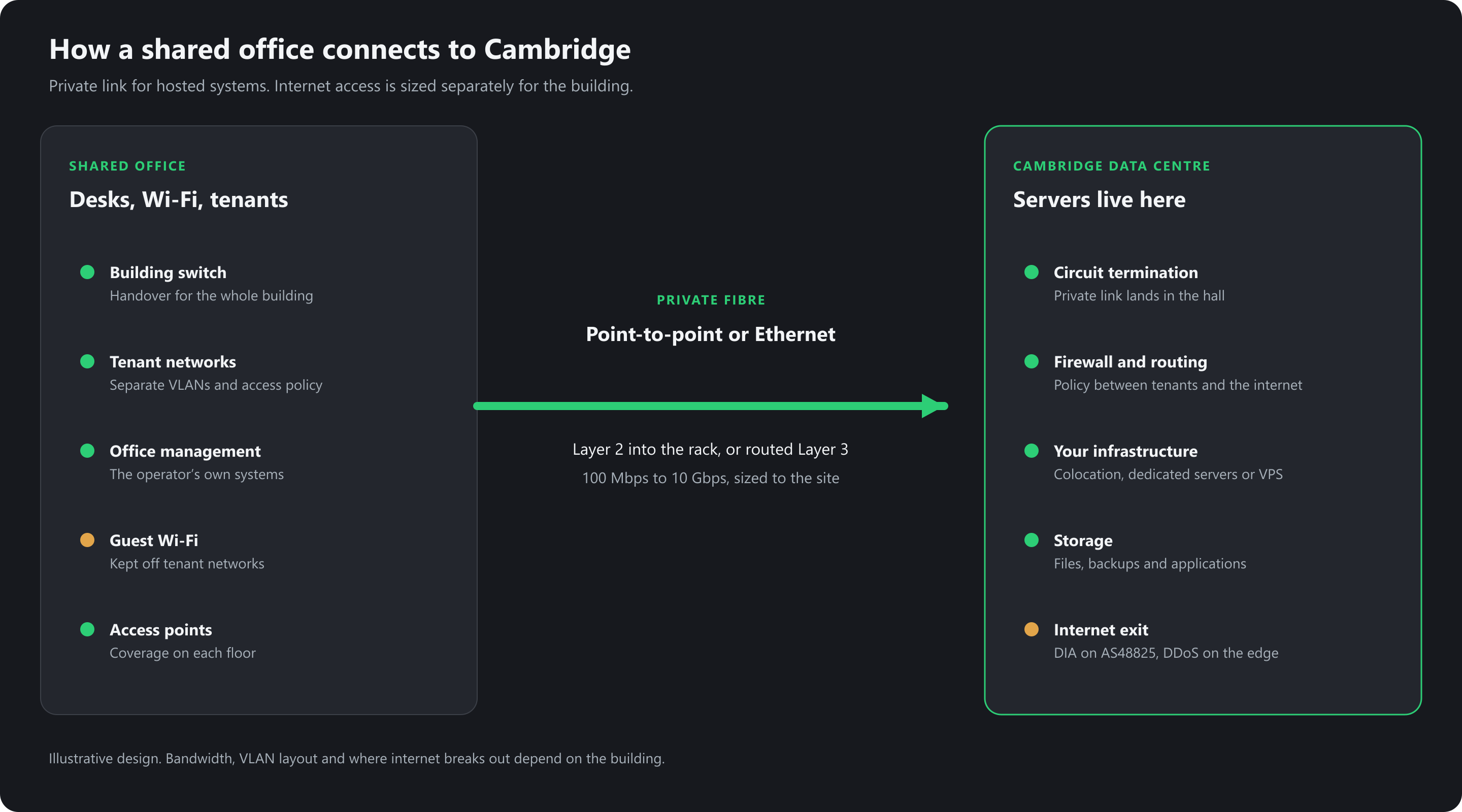
The office keeps switching and Wi-Fi. The private fibre carries that network to servers, storage and the firewall in Cambridge. Internet access is a separate decision, covered below.
How a stretched LAN for a shared office works
The building is connected to the data centre on private connectivity. Servers, storage, firewalls and related infrastructure are hosted in Cambridge. Internet access is part of the same design, either broken out locally or routed via the facility.
The office then runs a central IT environment without housing the whole stack on site.
| At the shared office | At the Fast2Host data centre |
|---|---|
| Switches and wireless | Colocated servers and storage |
| Tenant and staff connectivity | Firewalls and security systems |
| Tenant network segmentation | Private circuit termination |
| Private path back to the data centre | Internet connectivity and routing |
| Access to hosted applications | Monitoring and engineering support |
The two sites are designed to operate as one environment. Bandwidth, VLANs, routing and security policy are set for the building, not copied from a single-tenant HQ template.
Host the servers in Cambridge
A server room inside a shared office consumes space, power, cooling, physical security and ongoing maintenance. Those constraints get harder as the building fills up.
Colocation in our Cambridge facility keeps the hardware yours. You get resilient power, cooling, network connectivity and physical security, plus remote hands when something in the rack needs a person on site. What you stop doing is running a plant room next to a meeting suite.
If you would rather not own the hardware:
- Dedicated servers — bare metal in the same facility, built and supported by us.
- VPS hosting — virtual machines when a full server is more than the workload needs.
Many buildings mix the three: a firewall and file services in a cabinet, a dedicated host for a line-of-business application, and VPS for smaller tenants.
Private connectivity between the office and the data centre
Reaching hosted servers only over the public internet puts file shares, desktops and management traffic on the same path as general browsing. A private connection gives that traffic its own logical path.
It is the usual choice for:
- Hosted file servers and storage
- Business applications and databases
- Virtual desktop environments
- VoIP and communications systems
- Internal platforms and remote management
- Private cloud and virtualisation
The design covers bandwidth, VLANs, routing, access control and security policy. Separate networks can be built for individual tenants so businesses share the building’s infrastructure and stay logically apart.
Product starting points:
- Office ↔ Cambridge rack, VLAN-transparent: point-to-point
- Multi-site or multi-VLAN WAN: Carrier Ethernet
- How those differ from internet access: leased lines explained
Internet connectivity in the same design
Private connectivity does not replace internet access. The office still needs a path for SaaS, video, guest Wi-Fi and ordinary browsing. Fast2Host can supply that leased line / DIA alongside the private link, so connectivity, hosting and networking are coordinated instead of bought from three suppliers.
Internet connectivity on this kind of build typically covers:
- Tenant internet access
- Office staff and building administration
- Cloud applications, video conferencing and VoIP
- Guest Wi-Fi
- Other business-critical services
Traffic types can be separated with firewall policy, rate limits and VLANs. DIA on our network includes always-on DDoS protection.
Two breakout patterns are common:
- Internet via the data centre — the office default route follows the private link, and policy is applied next to the hosted firewalls.
- Local internet breakout — a DIA (or other access circuit) at the building, with the private link reserved for hosted systems.
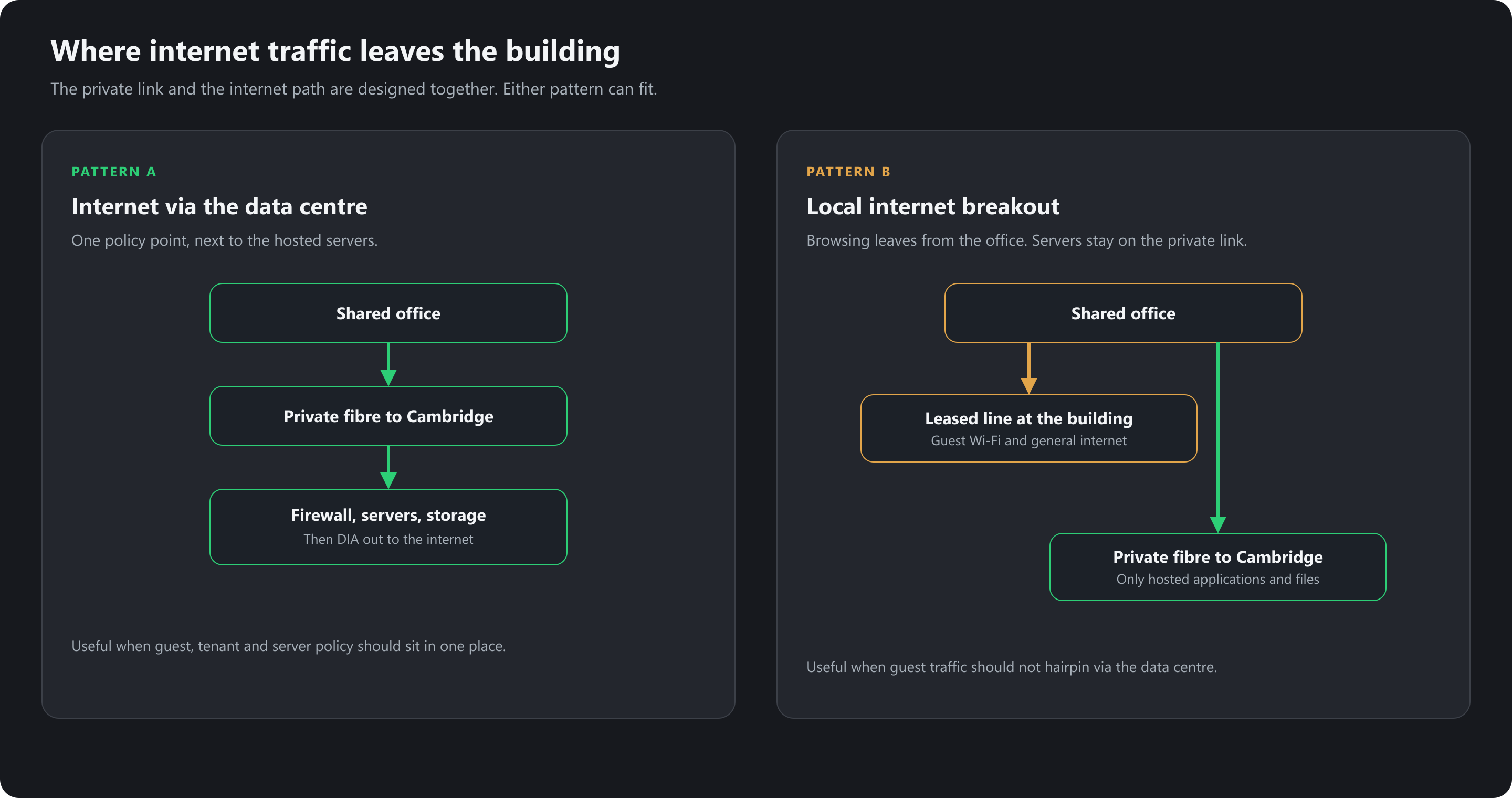
Pattern A sends internet through the data centre, so firewall policy sits next to the servers. Pattern B breaks internet out at the office and keeps the private fibre for hosted applications.
Which one fits depends on latency, firewall ownership, guest traffic and how much you want a single policy point. We size it from the building, not from a fixed bundle.
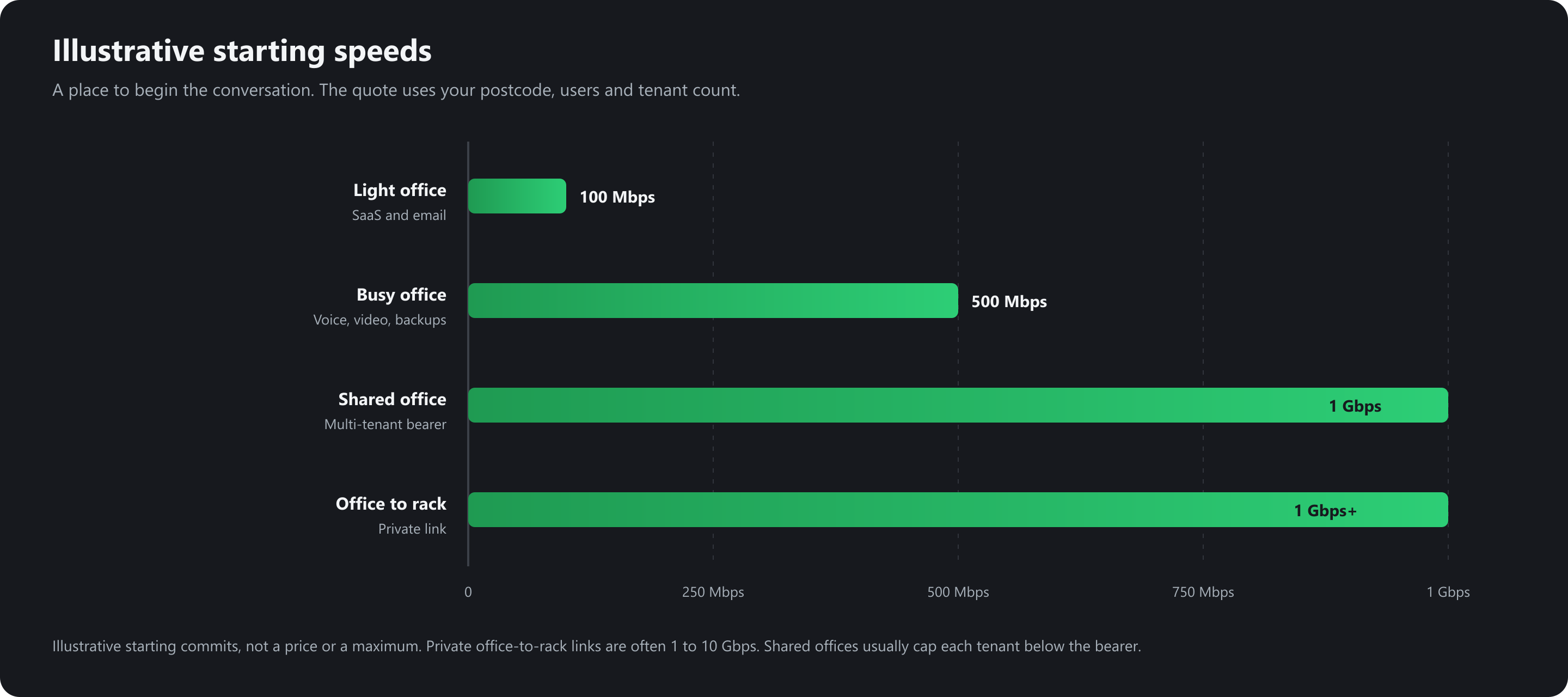
Starting points only. A shared office is often a 1 Gbps bearer with each tenant capped below that. Private links to the rack are often 1 to 10 Gbps. None of these figures is a quote.
To price internet access for the building, use the leased line quote tool. Enter the postcode and the bandwidth you have in mind. The wider menu is on internet connectivity.
Who this suits
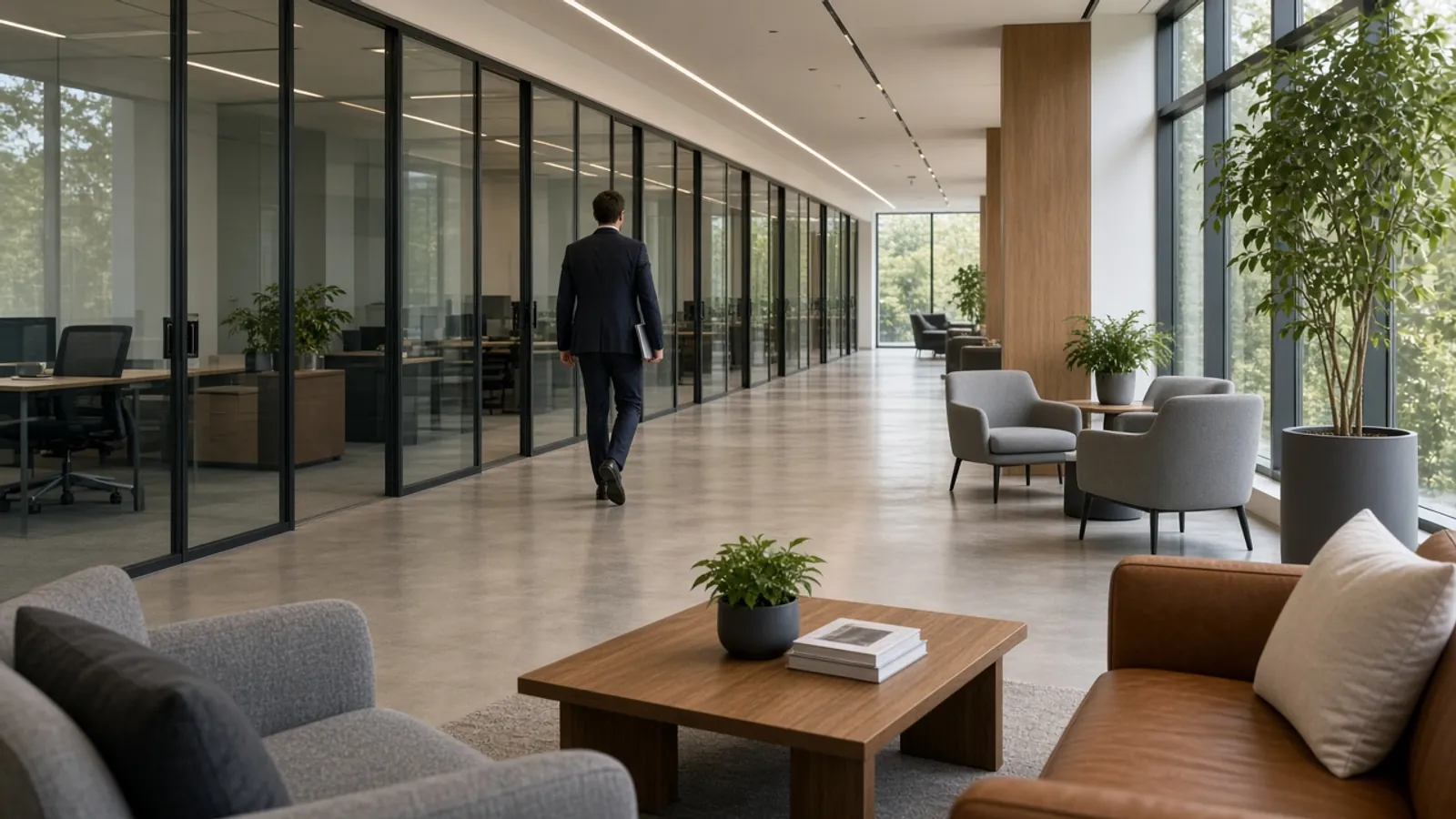
Serviced offices and business centres: private suites on a shared building, which is the same shape as the network underneath.
Coworking spaces. Many businesses and individuals on one bearer. A centrally managed network is easier to grow than a new circuit every time a desk is let.
Serviced offices. Tenants get access to managed infrastructure without a server cupboard and a complex LAN in every suite.
Business centres. Central hosting, a private path to it, and managed internet access become part of what the centre sells.
Multi-tenant buildings. Tenant traffic stays separated while management and connectivity stay central.
Businesses with more than one office. Further sites can be brought onto the same hosted environment, so the network looks consistent from each location. That is an Ethernet or point-to-point design question — feasibility depends on the address.
Less need for an on-site server room
Office space is the product. Using it for servers, UPS plant and cooling is a poor trade once the building is busy.
Moving the stack into a data centre takes these off the office checklist:
- Cooling and ventilation
- Electrical capacity and UPS
- Physical security of the kit
- Hardware maintenance, noise and replacement
- Backup arrangements tied to a room in the building
- Network resilience that depended on that room staying up
The office keeps switches, wireless and the circuit handover. The servers live where power, cooling and physical security are the job of the facility. A practical overview of what that facility provides is in what colocation includes.
Secure connectivity and tenant isolation
Shared buildings are a networking problem because several businesses use the same physical infrastructure. Each tenant needs reliable access. Their traffic should not be readable by the tenant next door.
A proper design separates them with VLANs, private routing, firewall policy and access control. They can share the bearer and still sit in different network environments.
A typical split looks like this:
- Tenant A, Tenant B, Tenant C — each with its own VLAN and policy
- Office management
- Building systems
- Guest Wi-Fi
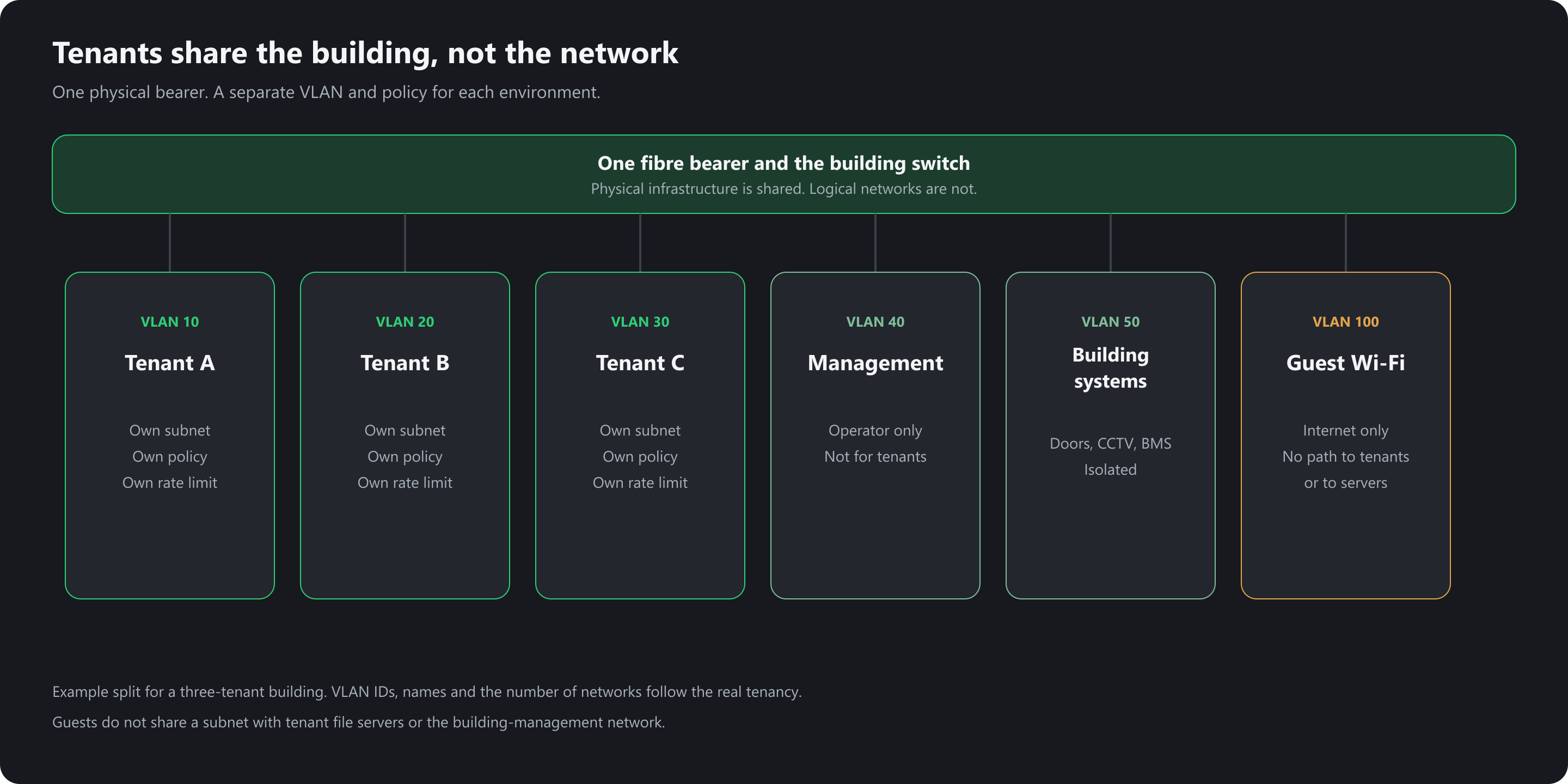
Same switches, same fibre. Each environment has its own VLAN. Guests have no route to tenant servers. The VLAN numbers above are an example.
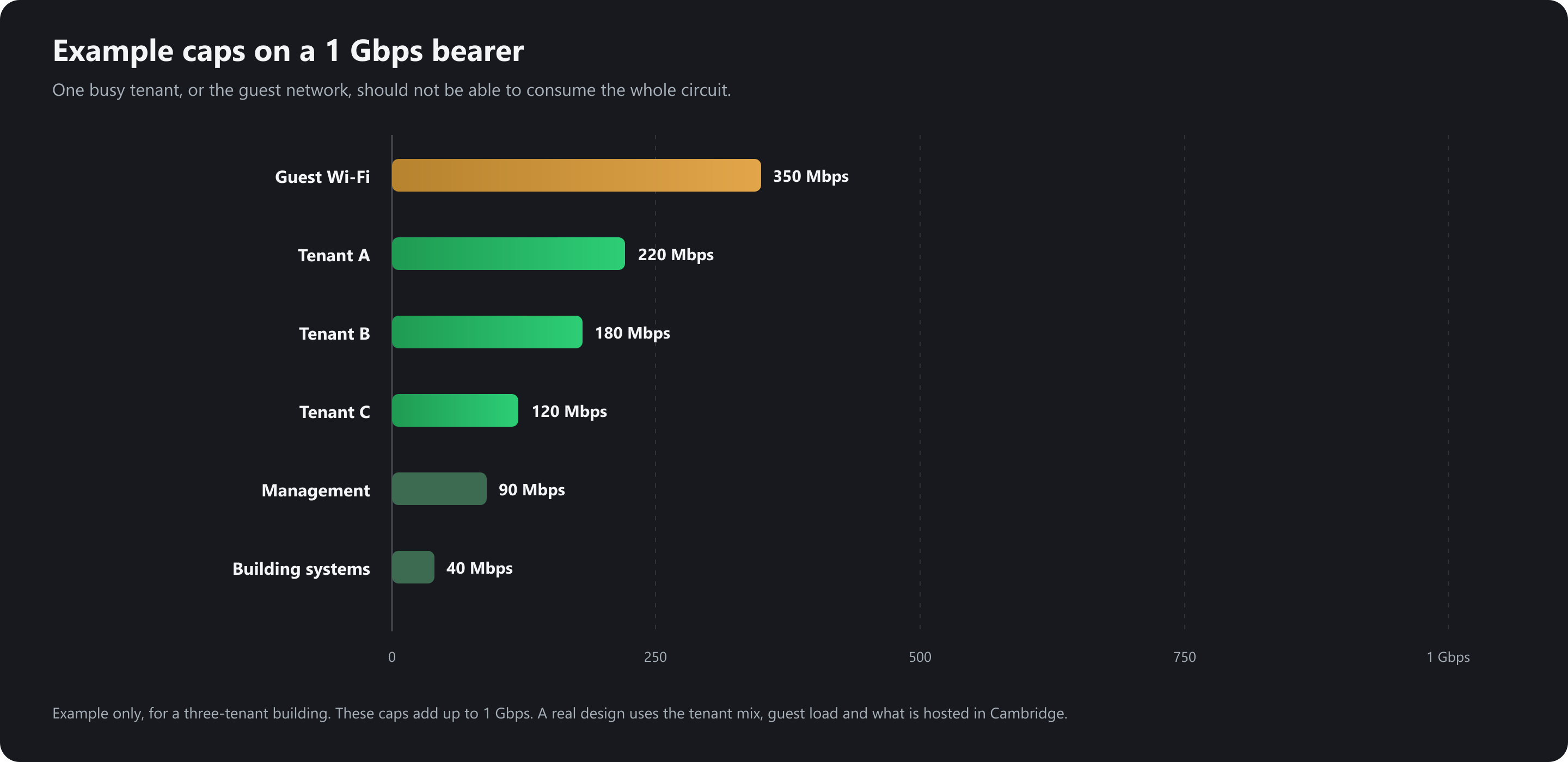
Example caps that add up to the bearer. Guest Wi-Fi is often the largest share in a coworking space, and it is still not allowed to take the circuit from the tenants.
The exact layout depends on the building, the number of tenants, the services on offer and how strict the isolation needs to be. Security belongs in the first design, not as a change request after go-live. On a shared DIA bearer we also rate-limit tenants so one busy occupier cannot starve the rest — the same model described in the leased line guide.
Room to grow without another server room
Extra server capacity, storage, bandwidth or network services can be added in the data centre. That does not require a second plant room, more cooling, or a landlord conversation about a riser cupboard.
The usual growth path is more U-space or a larger cabinet, a higher committed rate on the private link or the DIA, and another VLAN when a new tenant arrives. Start from the current building. Expand when the tenants and the workloads justify it.
One infrastructure partner
Shared-office operators often juggle an internet supplier, a hosting supplier, and someone else for firewalls and support. Faults fall between them.
Fast2Host can bring the pieces together:
- Colocation for hardware you already own
- Dedicated servers when you do not want to buy the metal
- VPS hosting for smaller virtual workloads
- Point-to-point or Ethernet between the office and the data centre
- Internet access for the building, priced in the quote tool
- Routing, and network design where you want us to do it
One UK team sees the access circuit and the handover into the rack. That is the practical gain when something fails at 8am and the tenants are already online.
Why Fast2Host
We operate our own data centre near Cambridge and our own network, AS48825. Colocation, hosting and connectivity are delivered from that infrastructure, including peering at LINX and LONAP.
For a shared office, that means the private link can land on equipment in a facility we run, rather than on rented space at the end of someone else’s network. The Cambridge hall, power and cooling are described on the data centre page.
Tell us the number of tenants, the office locations, the bandwidth you expect, whether you need private connectivity, and whether the servers are yours or ours. We will say what is feasible at the address before anyone orders fibre.
Connect the office to the data centre
If you run a coworking space, serviced office, business centre or multi-tenant building, a stretched LAN is worth scoping when the server room, the broadband and the tenant networks are starting to fight each other.
Private connectivity to Cambridge, a place for the servers, and internet access in the same design. One office network. Centrally hosted infrastructure.
Contact the UK network team and include the postcode, tenant count and whether you want Layer 2 into a rack, routed private access, or both.
Fast2Host — UK Hosting. Real Infrastructure. Real Engineers.
- Telephone: 01480 260 000
- Email: sales@fast2host.com
FAQ
Is a stretched LAN the same as a leased line?
No. A leased line / DIA is routed internet access. A stretched LAN is the private extension between the office and the hosted environment, usually point-to-point or Ethernet. Most shared offices want both.
Will our servers appear on the office network?
On a Layer 2 design, yes. Office VLANs can be presented in the Cambridge cabinet with no NAT on that path. A Layer 3 design routes between the sites instead, which is the better fit when tenants need stricter separation.
Can each tenant have a separate network?
Yes. VLAN and firewall separation on a shared bearer is the standard model for managed workspaces. Guest Wi-Fi, building systems and office management sit apart from tenant networks.
Do we have to buy our own servers?
No. Colocation is for hardware you own. Dedicated servers and VPS cover the cases where you want capacity without a purchase order for equipment.
Is this available at every UK address?
Connectivity, bandwidth, network design, tenant isolation and service availability depend on the site, carrier feasibility and the service you agree. We confirm that before quoting a date.
Connectivity options, bandwidth, network design, tenant isolation and service availability are subject to site location, feasibility and agreed service requirements.